For IBM Maximo Manage 9 · MAS on OpenShift

Every Maximo app.
One phone.

MaxSphere puts 93 Maximo modules — work orders, inventory, purchasing, contracts, HSE and permits — on the phone your teams already carry. Live against your Maximo, online or off.

  • No middleware
  • No data copies
  • Maximo security, as is
MaxSphere home screen with Maximo modules Inventory list showing low stock Purchase order approved in MaxSphere Purchase contract in force
PO 1103 · Approved
Seal AA519 · below reorder point
Received 2 lines into CENTRAL
Work OrdersService RequestsInventoryInventory UsageStoreroomsCount BooksPurchase RequisitionsPurchase OrdersReceivingInvoicesPurchase ContractsWarrantyPermit to WorkLOTOHSE IncidentsInvestigationsInspectionsAssetsMetersPreventive MaintenanceJob PlansRoutesLabor ReportingFailure Analysis Work OrdersService RequestsInventoryInventory UsageStoreroomsCount BooksPurchase RequisitionsPurchase OrdersReceivingInvoicesPurchase ContractsWarrantyPermit to WorkLOTOHSE IncidentsInvestigationsInspectionsAssetsMetersPreventive MaintenanceJob PlansRoutesLabor ReportingFailure Analysis
0Maximo modules
0business areas
0languages, incl. Arabic & Urdu
0middleware servers

One flow, end to end

From the storeroom
to the supplier, in your hand

A real Maximo day, done on a phone. Every step below is a live Maximo record.

01

Spot low stock

Search the storeroom, filter Low Stock, and see balance, reorder point and cost — read from Maximo's own inventory balances.

02

Issue to the work order

Create an inventory usage, pick item, quantity and work order, and complete it. Maximo posts the issue and updates stock.

03

Requisition, approve, order

Raise a requisition with Maximo's prices, approve it, and turn it into a purchase order linked back to every line.

04

Receive the delivery

One tap receives everything still open on the PO into the right storeroom and bin. Stock is back.

05

Lock in the price

Draft a purchase contract, add agreed prices, submit and approve. The agreement is in force with its ceiling and term.

Low stock in the central storeroom Inventory usage issued to work order 1002 Purchase requisition approved Purchase order received Purchase contract in force

The whole of Maximo

Not one app for one job.
The suite, mobile.

🔧

Work management

Work orders, service requests, scheduling, job plans, routes, PMs and labor reporting — with actuals, failure reporting and work logs that land in Maximo.

  • Work Orders
  • Service Requests
  • Preventive Maintenance
  • Job Plans
  • Failure Analysis
📦

Inventory

Balances by bin, low stock, issues, returns and transfers, count books.

🛒

Procurement

Requisitions, purchase orders, receiving and invoices — approvals included.

📜

Contracts

Purchase, lease and warranty contracts with price lines, value and term.

🏭

Assets & meters

Hierarchies, locations, meter readings and asset history.

🦺

HSE & permits

Permit to work with isolations and sign-offs, LOTO, incidents, investigations, hazards and risk assessments — the control of work, on site.

  • Permit to Work
  • LOTO
  • Incidents
  • Investigations
  • Risk Assessments
📋

Inspections

Build forms from templates, run them on assets, sign and complete.

👷

People & labor

Crews, crafts, labor reporting and pay approvals.

Try it yourself

Click through real Maximo flows, no sign-up

Fifteen tours, from reporting a fault to approving work through Maximo workflow, issuing parts, raising a hot work permit and running the Control Center. Every screen is from a real session against IBM Maximo Manage.

Start a tour

Everything in the app

93 Maximo modules. Find yours.

Type a Maximo app you use today, or browse by area.

Built for the field

The details that make it safe to roll out

“Saved” means saved

Every write is read back from Maximo before the app says it worked. No silent failures, no phantom records.

Offline-first

Lists are cached on the device and changes queue up without signal, then sync when you are back online.

Scan anything

QR and barcode scanning jumps straight to the asset, work order, location or permit.

AI built in

Summaries on records and an assistant that answers questions about your Maximo data.

11 languages

Including right-to-left Arabic and Urdu, for crews that don't work in English.

Control Center

Admins deploy MaxSphere's object structures and scripts to Maximo in one step, and choose which modules each site sees.

MaxSphere AI

Say it, snap it, ask it. Maximo does the rest.

  • Report a fault in your own words. Type, speak or photograph the problem; AI writes the title, picks the priority and finds the asset number, ready to submit as a service request.
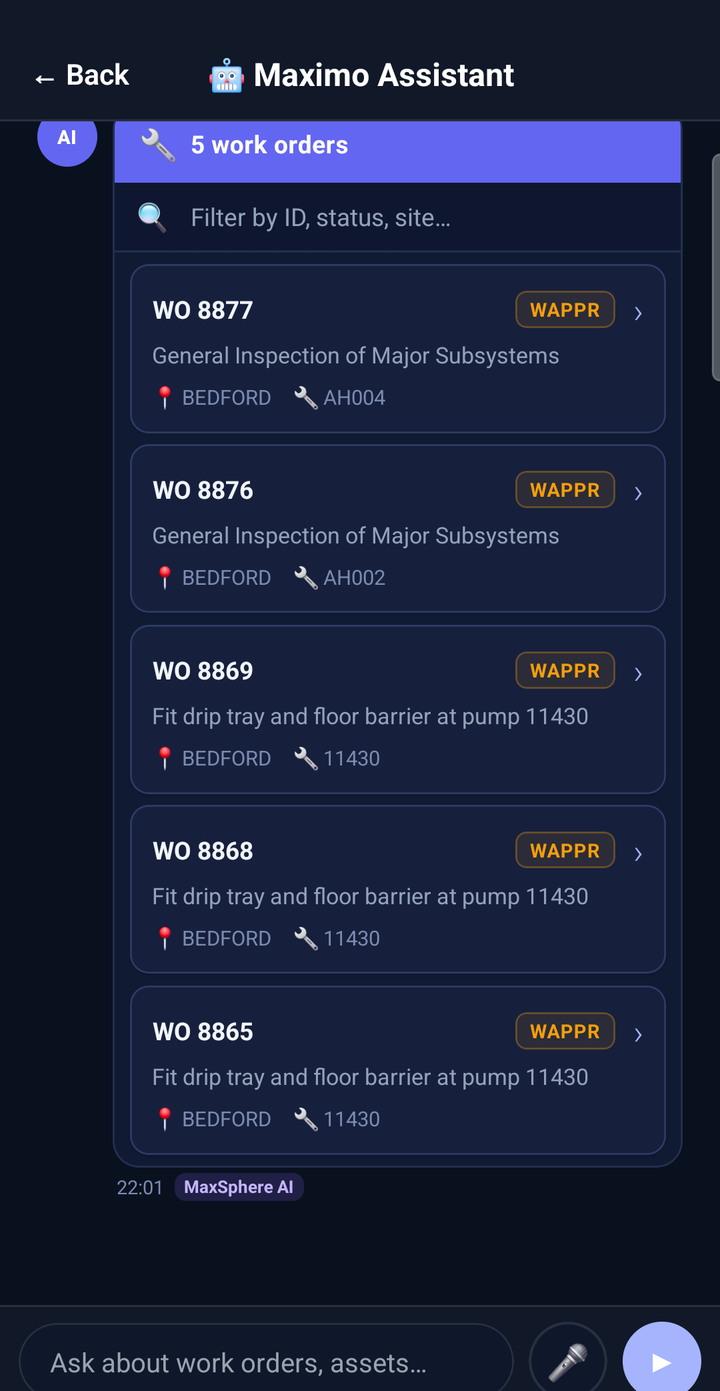
  • Ask Maximo questions. "Work orders waiting for approval at BEDFORD" returns live records you can open and act on.
  • Summaries on every record. Status, main risk and the next action on work orders, requests, assets, permits and more.
  • Admins get help too. Draft automation scripts from a plain description and get errors explained.

The app runs every Maximo query itself, with the user's own key. Only the question, photo or recording goes to the model, on MaxSphere AI or your own AI server.

Try the AI tour
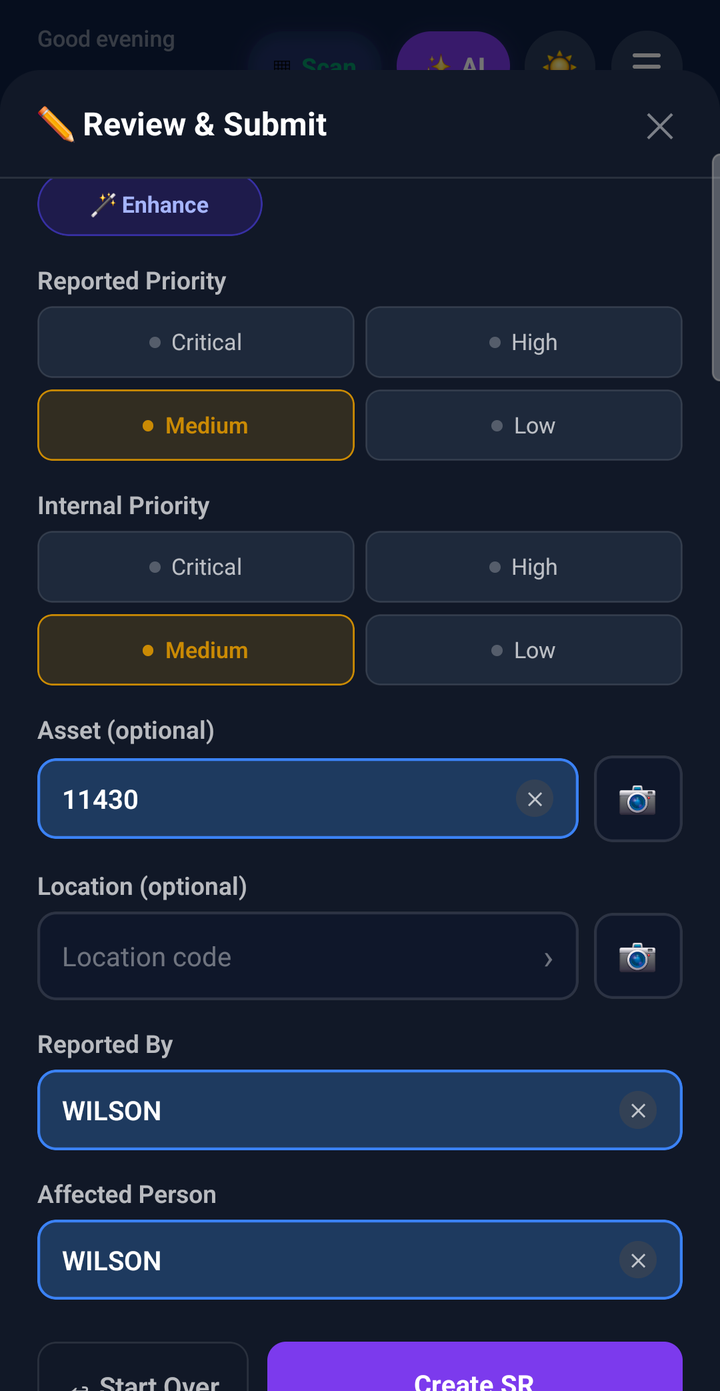
Service request structured by MaxSphere AI
Maximo Assistant answering with live work orders

Control Center

Run it like an enterprise app

  • One-tap setup. Deploy MaxSphere's automation scripts and object structures to your Maximo, and check them any time.
  • You choose the apps. Switch modules on or off for everyone, so each team sees only what it uses.
  • See what happens. System health, offline sync queue, conflicts, audit trail and error logs, on the phone.
  • Tune behaviour. Feature flags, offline access per module, cache lifetimes and data reconciliation against Maximo.

Protected by an admin PIN on the device. Users never see it.
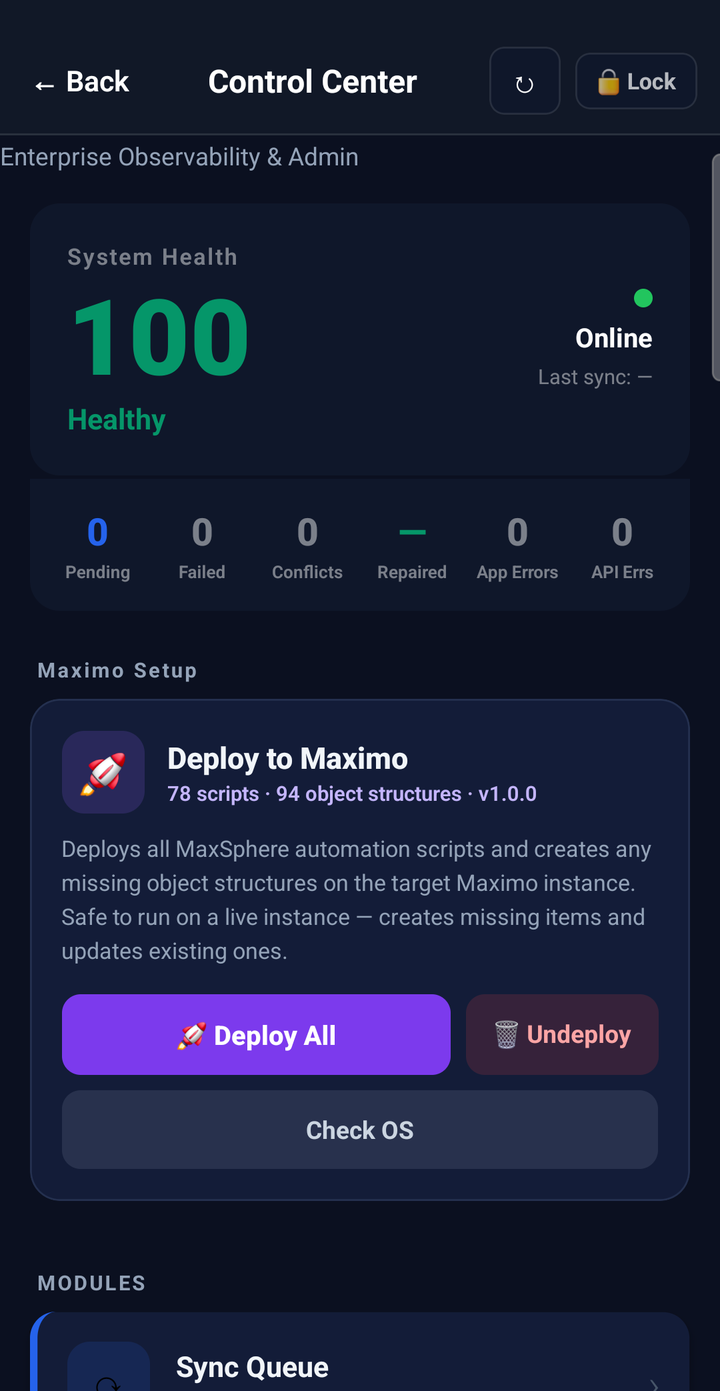
Control Center with system health and deploy to Maximo
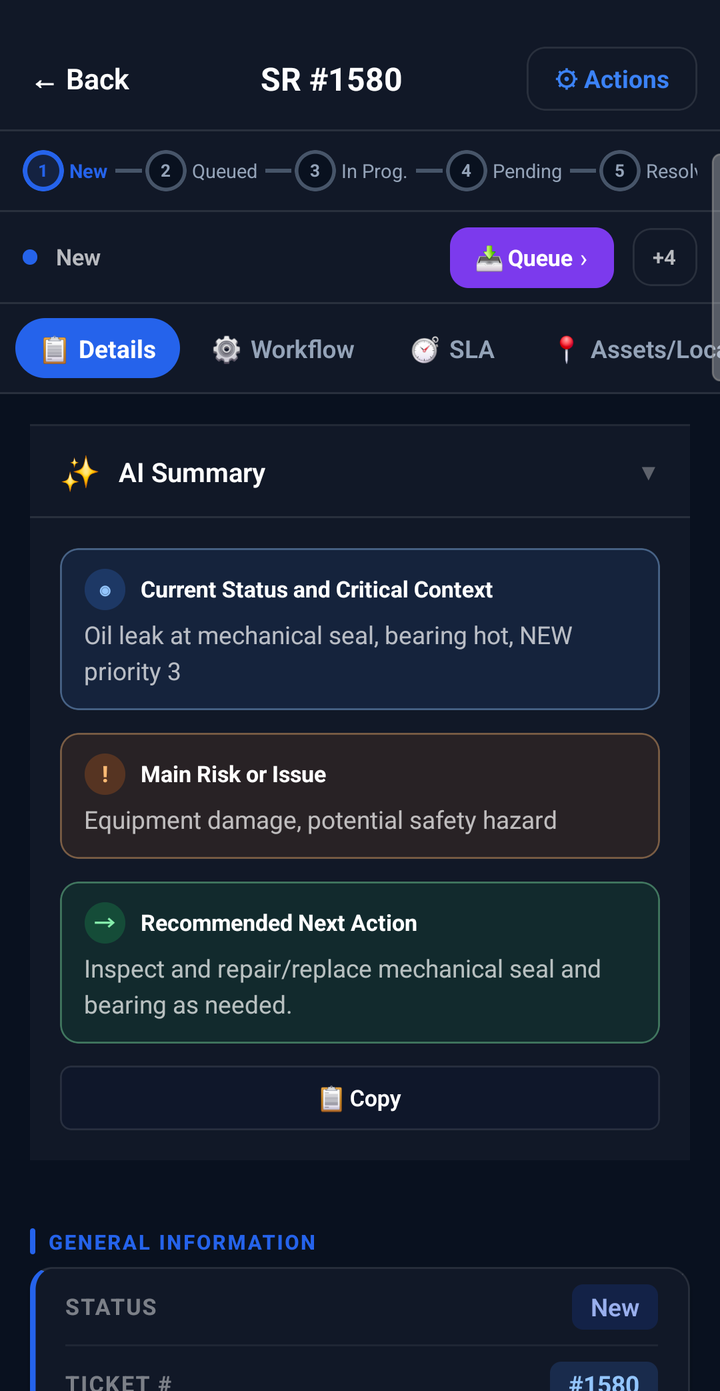
AI summary of a service request

Live in an afternoon

Three steps to Maximo, anywhere

  1. 1

    Connect

    Point MaxSphere at your Maximo Manage URL. Users sign in with their own Maximo API keys.

  2. 2

    Deploy

    From the Control Center, install MaxSphere's object structures and automation scripts on your instance.

  3. 3

    Go

    Hand out the app. Technicians, storeroom clerks, buyers and HSE teams work in Maximo from day one.

Security

Your data stays
in your Maximo

  • Direct to Maximo. Every read and write goes from the phone to your Maximo REST API. Your records are never stored by MaxSphere.
  • AI that sends only what it needs. AI features send the question, photo or recording to MaxSphere AI, or to your own AI server if you prefer. Maximo credentials never leave the device.
  • Maximo security, unchanged. Each user works with their own key, so security groups, sites and statuses apply as they do today.
  • Secure on the device. Credentials live in the phone's secure storage; the offline cache stays on the device.
  • Your rules. Status changes, approvals and validations run through Maximo's own business logic.

Who it's for

One app, every Maximo role

TechniciansWork orders, actuals, failure codes, permits
StoreroomIssues, returns, transfers, counts
BuyersRequisitions, orders, receiving, contracts
HSEIncidents, investigations, permits, LOTO
SupervisorsApprovals, inspections, dashboards

FAQ

Questions Maximo teams ask

Which Maximo versions does MaxSphere support?

MaxSphere is built and tested on IBM Maximo Application Suite 9 (Maximo Manage), on Red Hat OpenShift and standalone. Ask us about your version.

Does it replace IBM Maximo Mobile?

It complements it. MaxSphere covers the modules your teams use beyond the standard mobile apps — inventory, purchasing, contracts, HSE and more — in one place.

Do we need a server or middleware?

No. The app connects to Maximo's REST API directly. Setup adds object structures and scripts to Maximo itself.

Where does the AI run?

On MaxSphere AI, hosted on Cloudflare Workers AI, by default. The app sends only the question, photo or recording; Maximo queries run from the phone with each user's own key. You can point the app at your own Ollama or Whisper servers instead.

Does it work without signal?

Yes. Lists are cached on the device and changes are queued, then synced when the connection returns.

Can we choose which modules people see?

Yes. The Control Center lets administrators switch modules on or off for your organisation.

See MaxSphere on your Maximo

A 30-minute live demo against a real Maximo instance — your modules, your questions.

Book a demo

or write to [email protected]

Live demo · 30 minutes

Book your MaxSphere demo

Tell us a little about your Maximo. We reply within one working day.

Interested in
or email [email protected]